Your server. Your profiles.
Import WireGuard files, text, or QR codes, configure IKEv2/IPsec, keep several profiles, and choose a backup profile. VayuSetu does not run VPN servers or sell VPN access.
Explore the detailsVPN, encrypted DNS, and Safari ad blocking for Mac and iPhone.
Bring your own server and see what the system actually observed.
Mac: macOS 14+ · iPhone: iOS 17+ · Mac build 17 available
The Mac Home screen makes the active state legible: VPN + DNS + Safari, the current India–Delhi WireGuard profile, VayuSetu DNS, a protection timer and a single power control.
VayuSetu combines a bring-your-own VPN client, encrypted DNS, Safari content blocking, and a Mac network filter. The release notes call out signed and notarized Mac builds, profile controls, rule groups, schedules, time-limited allows, import/export, and persistent history.
Import WireGuard files, text, or QR codes, configure IKEv2/IPsec, keep several profiles, and choose a backup profile. VayuSetu does not run VPN servers or sell VPN access.
Explore the detailsVPN, encrypted DNS, and six Safari blockers can run separately or as a combined mode, with live state and the selected protection level visible in the app.
Explore the detailsTunnel health, handshake, public IP, DNS, resolver, blocked-domain, speed, quality, traffic, and adblock checks report observations and explain what they cannot prove.
Explore the detailsThe Mac filter can use app, signer, parent process, destination, port, and protocol context with modes, groups, schedules, expirations, imports, and exports. It does not read traffic contents.
Explore the detailsThere are no accounts, analytics, tracking, or VayuSetu servers. Keys and settings stay local, while configured services and explicitly requested checks remain visible data flows.
Explore the detailsPrivacy Lock is not an absolute kill switch, Safari blockers only affect Safari, OpenVPN is unsupported, and the Mac filter is not a packet inspector or an independent security audit.
Explore the detailsThese screenshots come from the repository and the running Mac app. VayuSetu connects the controls, evidence, and boundaries so a protection status has context.
Import WireGuard from a file, text, or QR code, configure IKEv2/IPsec, keep several profiles, and select a backup. VayuSetu is a client, not a VPN provider.
VPN, encrypted DNS, and Safari blockers can run independently or together. Light, Balanced, and Strict filtering make the tradeoff visible.
Health, handshakes, public IP, DNS, resolver, speed, quality, traffic, and adblock tests report evidence with explicit limits.
The Mac system extension can use app, signer, parent process, destination, port, and protocol context. It does not read traffic contents.
Ask me, Passive, or Block all. Add app, domain, wildcard, exact, CIDR, port, and direction rules. Groups, schedules, expirations, imports, exports, lists, and history keep the filter legible.
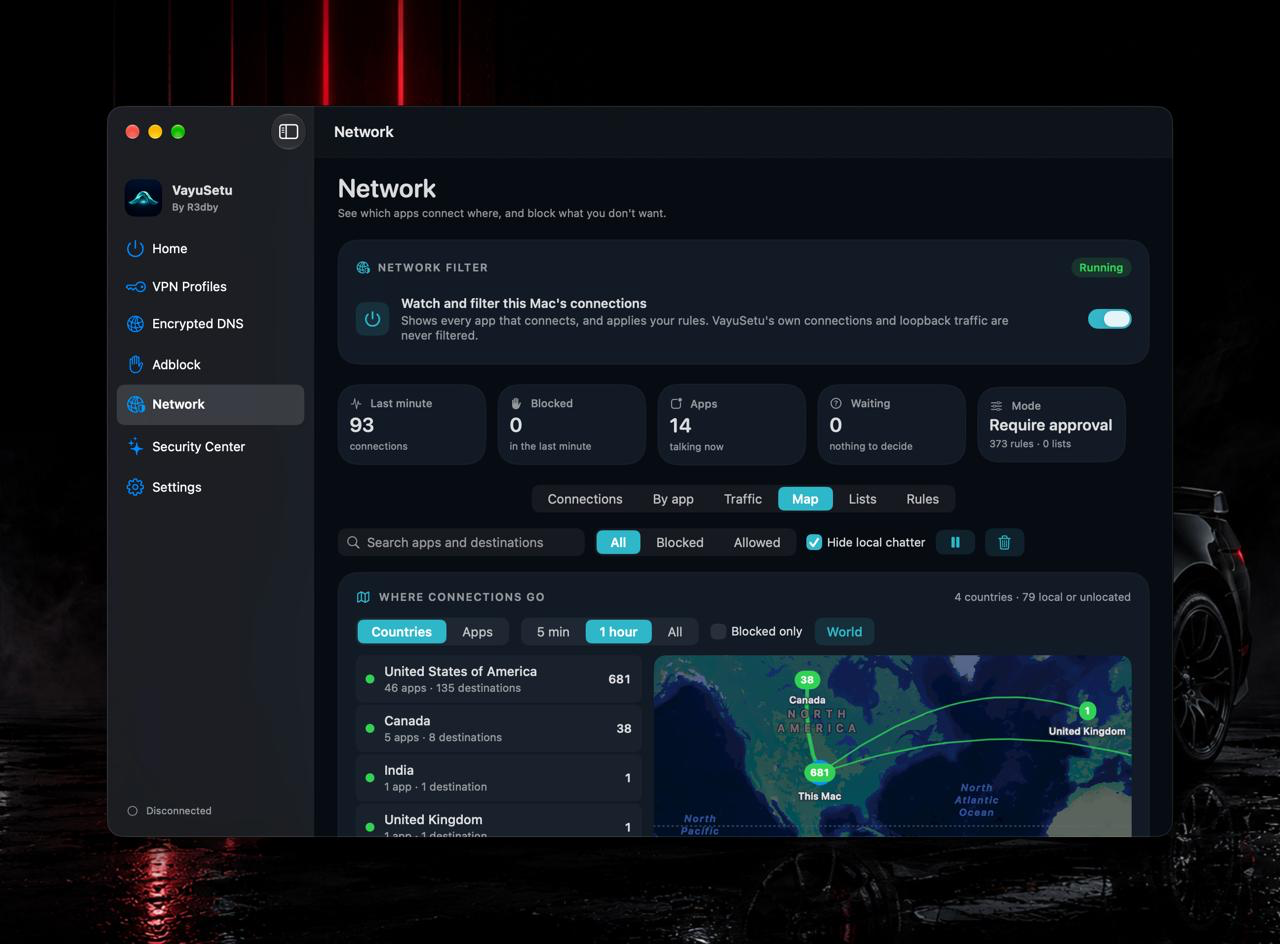
Open the repository screenshots at full size to inspect the controls, checks, filtering, and privacy surfaces.
The Mac Home screen makes the active state legible: VPN + DNS + Safari, the current India–Delhi WireGuard profile, VayuSetu DNS, a protection timer and a single power control.
Explore every feature family, controls, platform differences, and practical limits documented in the project README.
VayuSetu is a VPN client, encrypted-DNS app and Safari ad blocker for iPhone and Mac. It does not sell VPN service and runs no servers of its own. You bring a WireGuard or IKEv2 server, choose the encrypted DNS resolver you trust, and VayuSetu combines those protections with evidence-based status.
The current public release is VayuSetu for Mac 1.0 build 17: a Developer ID signed, notarized DMG for macOS 14 or later on Apple silicon or Intel. The iPhone app is submitted to App Review and its release path is waiting on Apple’s organization-account requirement for VPN apps.
The release page includes a SHA-256 checksum. Verify the DMG with shasum -a 256 before opening it.
Home combines VPN, DNS and Adblock. Choose VPN + DNS, VPN only, DNS only or Adblock only. The home screen also shows the session timer, live upload and download speed, and a seven-day chart of DNS requests handled and blocked.
Import a WireGuard file, pasted configuration or QR code on iPhone; configure WireGuard manually; or add an IKEv2/IPsec server through Apple’s native adapter. Several profiles can be kept, with an optional backup profile. OpenVPN is not supported.
Run Available Checks reports tunnel health, recent WireGuard handshakes, public IPv4 and IPv6, DNS reachability, resolution through the selected resolver and a known blocked-domain check. It says what was observed and what an app cannot prove, such as the absence of leaks from another app. Speed, connection-quality and traffic views are available.
Privacy Lock supports strict routing, connect on demand, automatic reconnect and an optional dual-stack requirement. It is not an absolute kill switch because Apple keeps system exceptions.
The Mac Network page is a Little Snitch-like connection decision surface implemented as a separate macOS content-filter system extension. It sees the app, signer, parent process, destination, port and protocol, but does not read traffic contents.
The same lists feed six Safari content blockers. The Mac menu bar exposes VPN, encrypted DNS, Adblock and network-filter status. Mac URL actions include vayusetu://protection/dns/on, vayusetu://network/profile/Work and vayusetu://network/mode/passive. iPhone Shortcuts and Siri can switch DNS-only, VPN and ad blocking.
Dynamic Island notifications, widgets and Control Center controls are iPhone features. The Mac app uses the URL actions instead.
VayuSetu has no accounts, analytics, tracking or servers. It contacts only services needed by your selected configuration or an action you request: your VPN server, chosen DNS resolver, enabled filter-list sources, a public-IP check, Cloudflare speed-test servers, optional RIPEstat ownership lookup and the adblock test hosts.
The Mac and iPhone apps share the store, tunnel controller, profile and DNS code, filter engine and checks while keeping platform-specific screens and packet-tunnel extensions. WireGuard uses the official WireGuard Apple adapter and wireguard-go; IKEv2 uses Apple’s native adapter.
The DNS runtime runs inside the tunnel, speaks DNS-over-HTTPS or DNS-over-TLS, caches briefly, checks CNAME chains and can fall back to another encrypted resolver. Enabled lists compile into a compact snapshot used by the tunnel and six Safari extensions. The Mac filter uses NEFilterDataProvider and a private XPC connection restricted to VayuSetu by code-signature checks.
The source is published for review but is proprietary. VayuSetu includes WireGuard Apple adapter and wireguard-go under their own licenses, the Public Suffix List and filter lists credited in the app. The repository contains iOS, macOS, shared core, extensions and architecture/security documentation.
02 / UNDER THE SURFACE
A SwiftUI interface, an engine contract, system WebKit, and a Rust core each own a distinct part of the browser.
VPN, encrypted DNS, Safari blockers, Privacy Lock
WireGuard Apple adapter / wireguard-go and native IKEv2
NEFilterDataProvider, XPC checks, rules, lists and modes
Checks, status, history, local settings and transparent limits
Conceptual boundaries, not a sequential request pipeline. The Swift shell connects to WebKit and to the Rust core through separate interfaces.
The product controls the client experience while the user supplies a WireGuard or IKEv2 endpoint.
Checks report observations and their limits instead of claiming that a tunnel proves every packet is protected.
VPN, DNS, Safari blockers, and Mac network filtering use platform extensions with explicit boundaries.
YOUR DATA. YOUR CHOICE.
No VayuSetu account, analytics, tracking, or VayuSetu servers. Profiles, keys, and settings stay local, with credentials in Keychain. Network contacts are limited to configured VPN/DNS services, enabled list sources, and services requested by checks such as public-IP, speed, RIPEstat, and adblock tests.
VayuSetu is not a VPN provider; you need your own server. OpenVPN and certificate-based IKEv2 are unsupported.
Privacy Lock is not an absolute kill switch, resolver traffic can have documented tradeoffs, and Safari blockers only affect Safari.
The Mac filter is an app-level context filter, not a packet inspector. It can be switched off and has not had heavy traffic validation or an independent security audit.
Mac 1.0 is signed, notarized, and stapled. The iPhone build was submitted but is blocked by the organization developer-account requirement.
READY WHEN YOU ARE
Try the release candidate on Mac, or request a TestFlight invitation for iPhone and iPad.
Apple silicon & Intel · macOS 14+ · signed, notarized, stapled
Download for Mac8e7c62b01d98299f848ce04932b43b3f08e06892994799ffb978109ef5f4c1b0Compare this value with the SHA-256 of the downloaded file.
Release information checked 18 October 2026. GitHub release notes remain the source for updates. Beta access may change.